

We’re moving beyond searching with only broad subject categories. Our newest update helps you find specialized, high-quality goals tailored to the unique characteristics of the students on your caseload.
Every special education teacher knows the feeling of writing an IEP for a student with a complex profile. You want to get it right, but it requires nuance and specificity. You know writing it will take focused effort and meticulous research. But it isn’t just getting the IEP done faster; you want the confidence that comes from knowing the IEP is actionable and aligned to your student’s needs.
The IEP must articulate the student’s strengths and needs with clarity so everyone on the team is aware of the impact of the student’s disabilities across subject areas.
That feeling is why we are thrilled to introduce a major update designed to help you realize that outcome: the Student Characteristics Filter within Browse Goals.

Seeing the Student, Not Just the Subject
Students don’t experience their learning differences in isolation. A student with ADHD doesn’t stop needing executive function support when they walk into a math classroom.
Our new Student Characteristics Filter changes how you browse goals. Instead of simply searching by subject, you can now filter content specifically tailored for students with specific designations:
- Autism
- ADHD
- Dyslexia
- Blind/Low Vision
- Deaf/Hard of Hearing
Why This is Transformational
This isn’t just a new dropdown menu; it’s a shift in how we organize specialized instruction within Toolkit. When you select a characteristic, Toolkit now cuts across all subject areas to surface relevant content.
For example, selecting the Dyslexia filter allows you to surface highly specialized goal content tailored to that student across areas like Writing and Math, not just a single subject like Reading.
This update immediately unlocks:
- Access to New Content: We are releasing 450+ brand-new specialized pages aligned specifically to these five areas: Autism, ADHD, Dyslexia, Blind/Low Vision and Deaf/Hard of Hearing.
- Easy Access to Existing Content: We’ve re-tagged over 600 existing pages to map to the specific characteristics that you select as you browse goals.
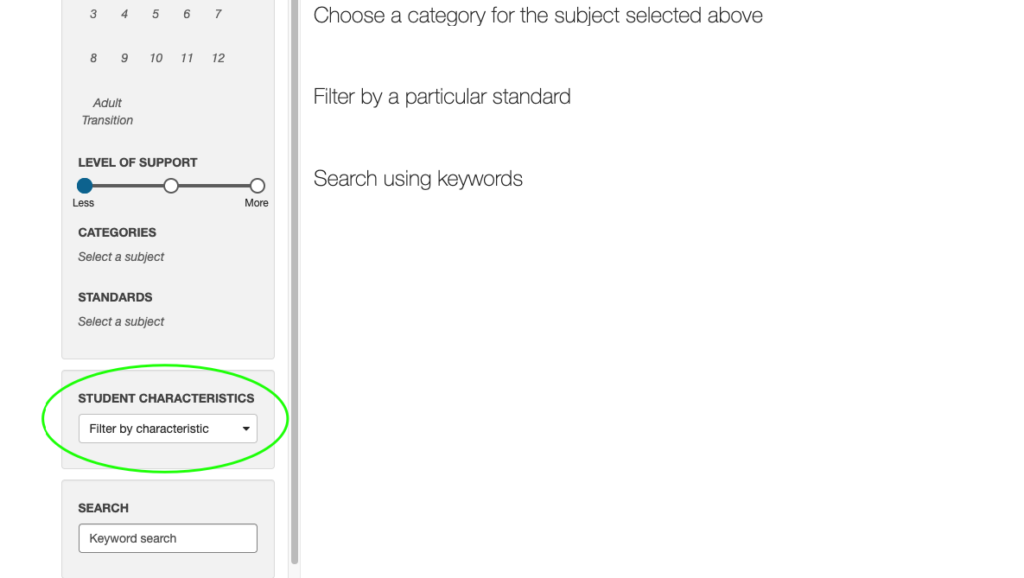
How to Use Browse by Characteristic
- Navigate to “Browse Goals”. Log in to the Toolkit and click on the Browse Goals tab in the main navigation.
- Locate the New Filter. Instead of going straight to the “Subject” dropdown, look for the new dropdown menu labeled “Filter by Characteristic.”
- Select a Profile. Choose one of the five new designations:
- Autism
- ADHD
- Dyslexia
- Blind/Low Vision
- Deaf/Hard of Hearing
- Explore Cross-Subject Results. Watch as the results update to show you goals from various academic domains (Math, Reading, Behavior, etc.) that are specifically aligned to that student profile.
Built on Sound Research
Excellent IEPs must be grounded in evidence. The content surfaced by these filters is built on robust research, including the Neurodiversity-Paradigm Based Framework, the Expanded Core Curriculum for students with blind visual impairment and deaf hard-of-hearing designations, and structured literacy approaches like Orton-Gillingham.
With the Student Characteristics Filter, you spend less time searching and more time strategizing. You move closer to delivering instruction with a level of excellence that truly meets the diversity of your classroom.
